Visual Tour
A visual walkthrough of the MWFA Sunday Masters app. Toggle between Light and Dark screenshots below, or print/save this guide as a PDF handout.
Match Card
Anatomy of a Match Card (What You Can Tap)
Expand
expand_more
Every fixture card packs 7 interactive features into one compact view. Tip: You can screenshot this section to share in your team's WhatsApp chat!
Sun 18 Oct
schedule 08:00
Next
1
🗳️ VOTE
7
INTR
2
Opponent
Harbord
3
place
Boondah Rd 2
info_outline
4
(portable goals) 5
Map open_in_new
6
1
Match Status Badge
Shows at most 1 recent Past match (grey), any game playing Now (orange), and your upcoming Next match (green).
2
Your Team Badge (Tap)
Coloured with your team's shirt colours. Tap it to open your own team's manager contact card.
3
Opponent Strip & Contacts (Tap)
Mini circle shows opponent shirt colours to spot kit clashes. Tap the underlined team name to Call, SMS, or WhatsApp their manager.
4
Playing Field Status (Tap)
Tap grass fields to open Northern Beaches Council live wet weather status, or tap synthetic pitches for synthetic status and notes.
5
Draw Sheet Notes
Displays official fixture notes such as (portable goals) or (nets may be needed for goals).
6
Google Maps Link (Tap)
Opens Google Maps directions directly to the playing field.
7
Match Hub & Poll Pills (Tap)
When polls are enabled, upcoming matches show 🗳️ VOTE (or VOTED 👍) to register attendance. Completed matches display FINISHED or a score pill (e.g. W 3 - 1) when results are recorded.
Setup
Selecting Your Season & Team
Expand
expand_more
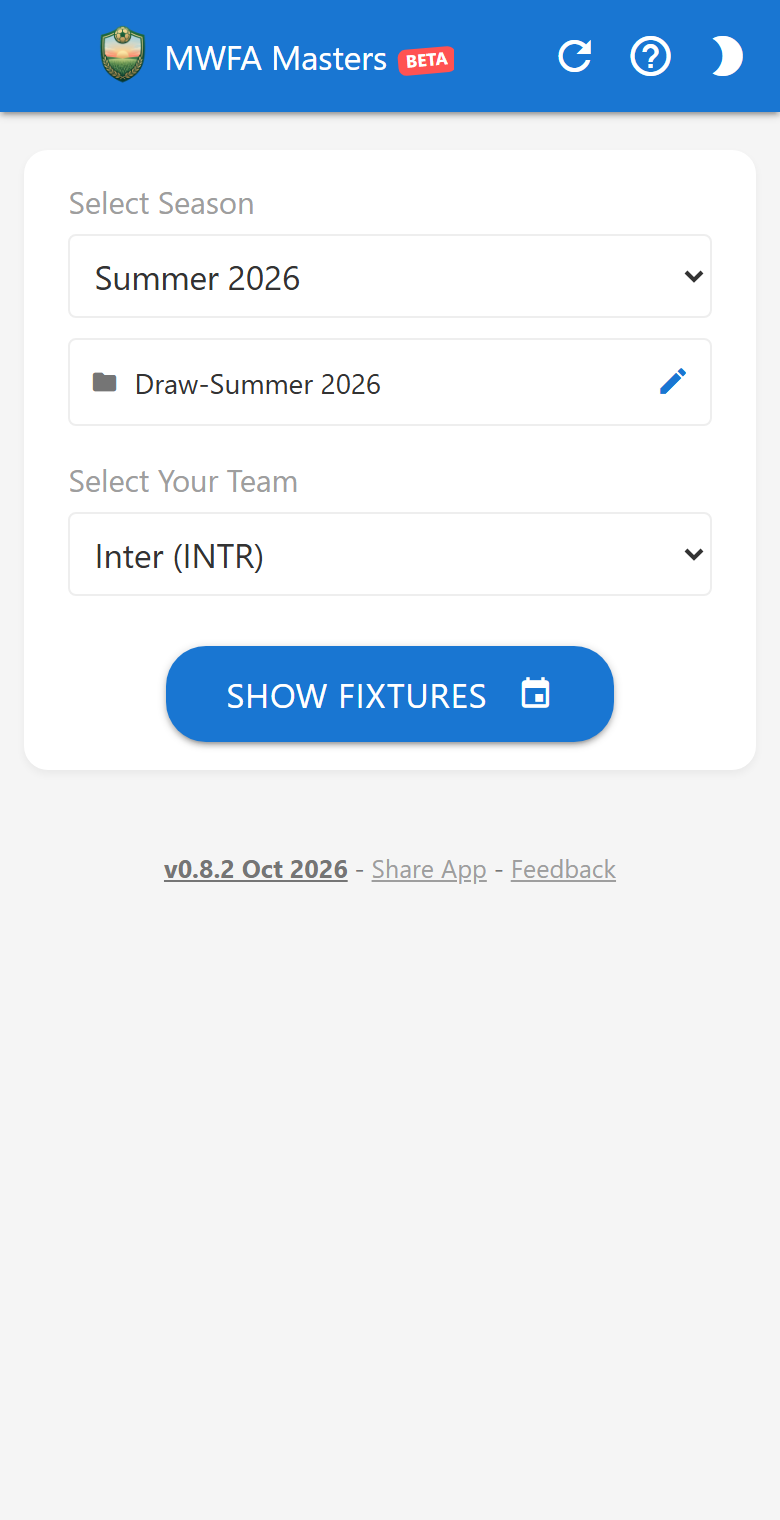
1
Automatic Active Season
The Select Season dropdown automatically selects the active MWFA Masters season (such as Summer 2026 -> Draw-Summer 2026). Power users can tap the pencil icon to enter a custom spreadsheet tab name.
2
Pick Your Team Once
Select your team (for example, Inter (INTR)) from the alphabetical list and tap Show Fixtures.
3
Saved on Your Device
Your selected season and team are saved in your browser so the app opens straight to your fixtures every Sunday morning.
Timeline
Match Timeline & Quick Team Switching
Expand
expand_more
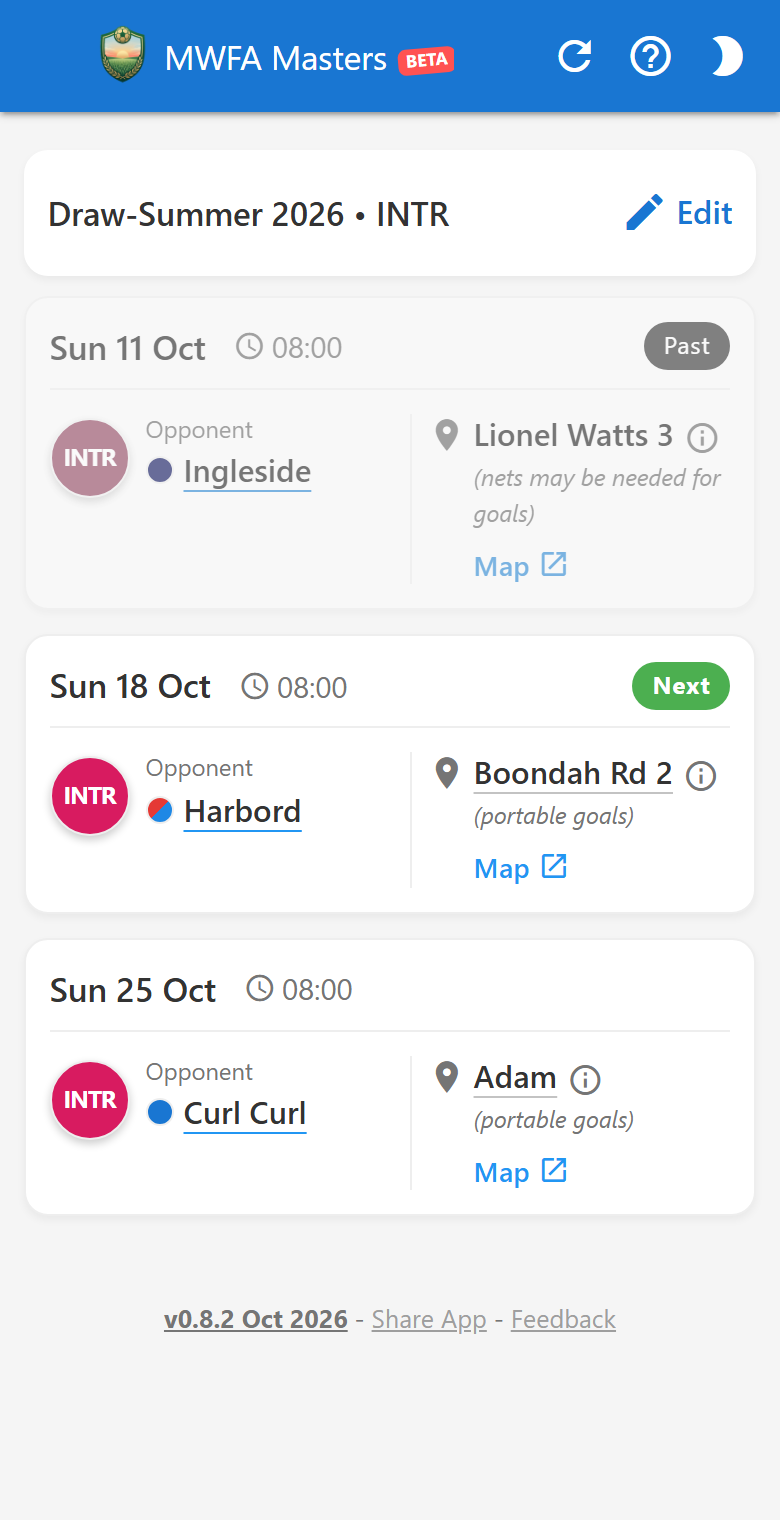
1
Compact Summary Bar (`Edit`)
Once your fixtures load, the selection form collapses into Draw-Summer 2026 • INTR to maximize screen space. Tap Edit anytime to check another team or season.
2
Smart Timeline Filtering (`Past`, `Now`, `Next`)
To prevent endless scrolling later in the season, the app displays at most 1 recent completed game (grey Past badge, slightly dimmed), followed immediately by your upcoming game (green Next badge) and future rounds.
3
Visual Kit-Clash Check
Compare your INTR badge on the left with the mini coloured circle next to Ingleside, Harbord, or Curl Curl to spot shirt clashes before match day.
Contacts
One-Tap Manager Contacts (Call, SMS, WhatsApp, Copy)
Expand
expand_more
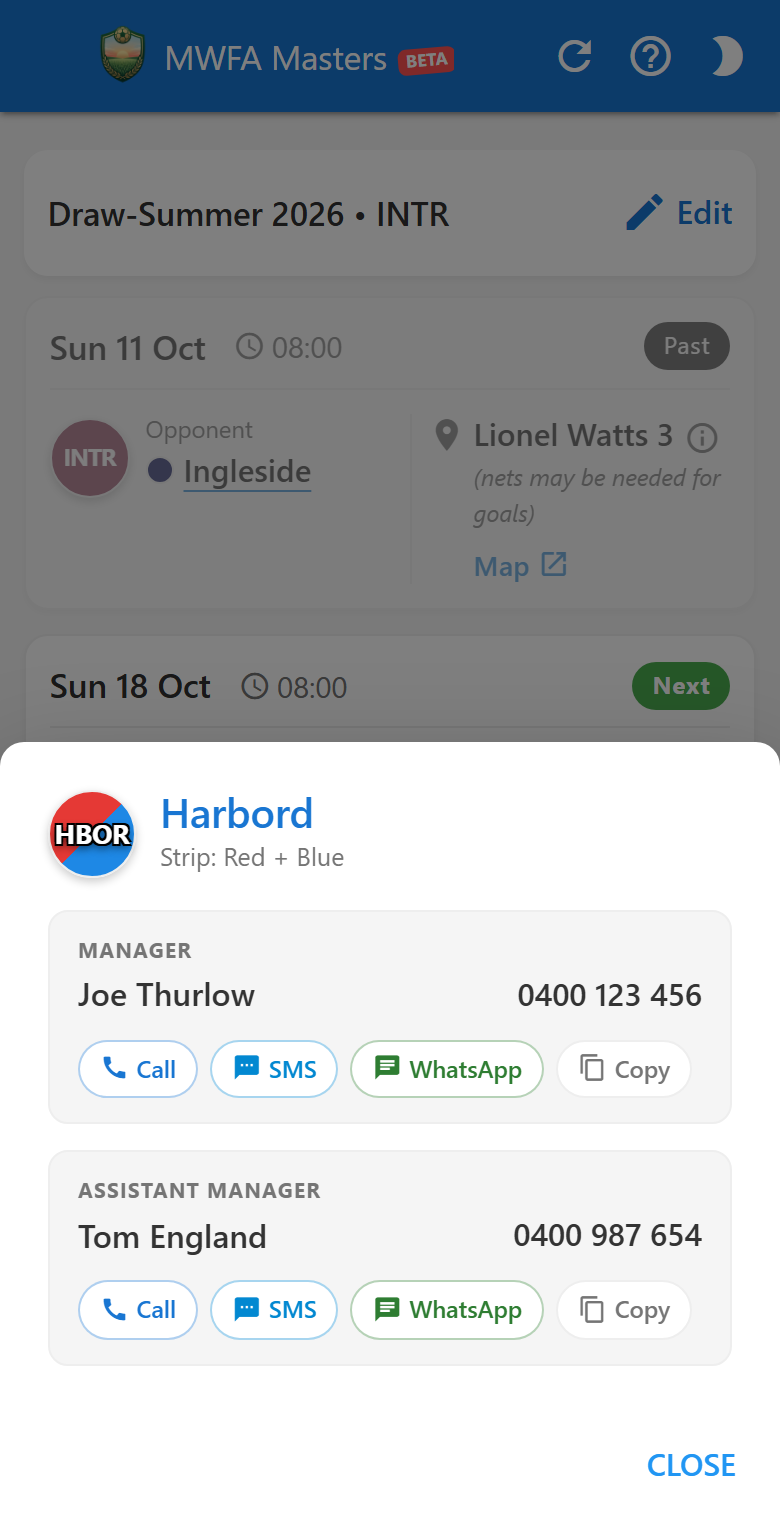
1
Tap Either Team
Tap the underlined opponent name (such as Harbord) or your own team's circular badge (INTR) to open their directory card.
2
Official Strip & Role Cards
The popup header shows the team's badge and official strip colour text (Strip: Red & Blue), with separate cards for the Manager and Assistant Manager.
3
Pre-Filled SMS & WhatsApp Greeting
Tap Call to dial immediately, SMS or WhatsApp to open a chat pre-filled with "Hi [FirstName], regarding our MWFA Masters match...", or Copy to copy the formatted number.
Grounds
Wet Weather Ground Status & Synthetic Pitches
Expand
expand_more
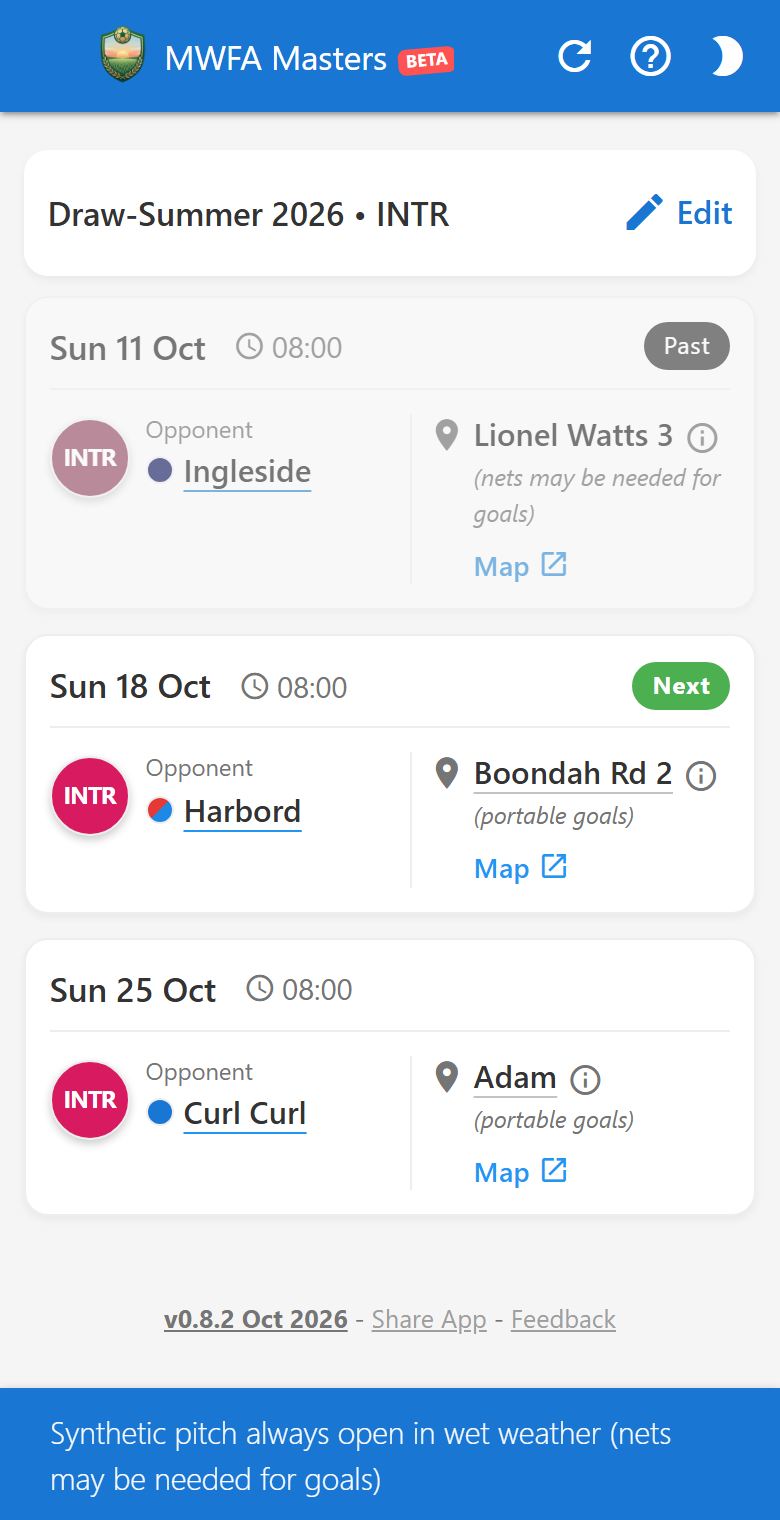
1
Synthetic Pitch Notification
Tapping an all-weather synthetic ground (Lionel Watts 3, Lionel Watts 4, or Cammeray) displays an instant confirmation banner: "Synthetic pitch always open in wet weather" plus any field notes from the draw sheet.
2
Live Council Wet Weather Page
Tapping any grass ground (such as Boondah Rd 2 or Adam) opens the official Northern Beaches Council sportsfields status page pre-filtered for that specific venue.
3
One-Tap Google Maps
Tap Map below the ground name to open Google Maps directions to the field.
Utility
Installing, Sharing & App Diagnostics
Expand
expand_more
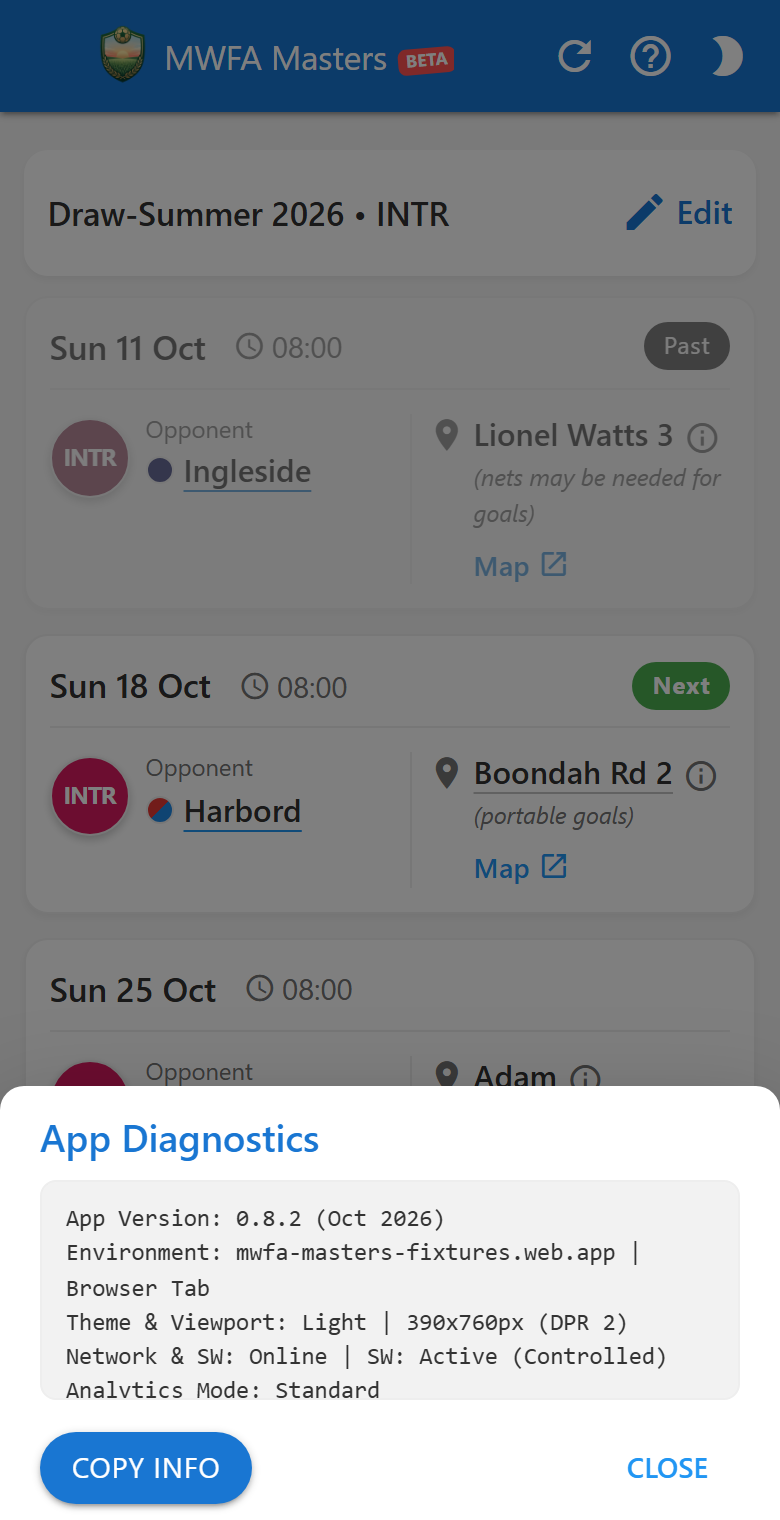
1
Install to Home Screen & Offline Support
Add the app to your phone's Home Screen (Safari Share -> Add to Home Screen on iPhone, or Install App on Android). Your fixtures are cached for offline viewing and the app automatically reloads when a new version is published.
2
Share App & Feedback
Tap Share App in the bottom footer (or Help popup) to share the app via WhatsApp, SMS, or AirDrop, or tap Feedback to email the developer.
3
Compact App Diagnostics
Tapping the underlined version number (v0.10.1 October 2026) in the footer opens a compact, scrollable diagnostics box. Tap Copy Info to include your setup details when sending feedback.
Polls
Player Availability Polls & WhatsApp Squad Sharing
Expand
expand_more
✔ Select one (tap again to remove)
1 vote
✔
👍 YES, I'll play
1
👎 NO, can't make it
0
🤔 Don't know yet
0
share
Share Poll
Closes Sun 25 Oct 08:00
View votes (1) >
1
Match Card Poll Pills (🗳️ VOTE & VOTED 👍)
Upcoming fixture cards display interactive poll pills. Tap 🗳️ VOTE to open the match poll, or unlock it using your team's 4-digit Team Poll Access PIN.
2
Player PIN Security & Cross-Device Recognition
Register your mobile number and set a personal 4-digit Player PIN. The app hashes your PIN using client-side SHA-256 before saving it, ensuring nobody else can modify your vote from another phone or tablet.
3
WhatsApp-Style Live Voting & Toggle
Tap your choice (YES, I'll play, NO, can't make it, or Don't know yet). Selected options highlight in green with a live percentage bar. Tap again to retract, or tap another option to switch your vote instantly.
4
Universal Poll Sharing & Auto-Closing
Tap Share Poll to generate a compact, 4-line match summary with ground venue, optional Team PIN, and a short one-tap voting link for your squad's WhatsApp chat or group messages. The card indicates when voting locks for team selection.
Roster
Live Squad Roster & Manager Vote Moderation
Expand
expand_more
arrow_back Back to Poll
content_copy Copy Results
👍 YES, I'll play
1 vote
Milan Ristic
You
0400 111 222
Today 08:30
Remove
👎 NO, can't make it
0 votes
No votes
🤔 Don't know yet
0 votes
No votes
1
Live Squad Roster Access (
View votes)
Tapping View votes opens the dedicated roster screen, breaking down all confirmed players across YES, NO, and MAYBE categories in real-time.
2
Player Identity Tags & Timestamps
Each voter row shows the player's name and confirmation time, with a blue You badge highlighting your own vote. Registered mobile numbers are visible to team managers for quick contact.
3
Manager Vote Moderation (Inline
Remove Button)
Verified team managers see an inline red Remove button next to each attendee. Tapping it instantly removes an accidental or duplicate submission, immediately updating squad headcounts across all devices.
4
One-Tap Results Copying
Tap Copy Results to copy a formatted text breakdown of confirmed attendees directly to your clipboard, ready for match-day team sheets or group announcements.
Manager
Team Manager Administration (Poll Settings & PIN Reset)
Expand
expand_more
admin_panel_settings
Poll Options
Close
Changes saved below apply immediately to this poll and all upcoming polls.
👍 YES
, I'll play
👎 NO
, can't make it
☑
Enable 3rd Option
🤔
Don't know yet
Poll Closes
At Match Kick-off (0h)
arrow_drop_down
Team Code Length
4 digits
arrow_drop_down
Team Access Code
1001
Save Options
Cancel
Player PIN Administration
Player Mobile to Reset
Reset Player PIN
1
Automatic Manager Recognition & 6-Digit PIN
Team Managers and Assistant Managers listed in the official MWFA directory are recognized automatically by their mobile number. Entering the 6-digit Manager PIN unlocks poll settings for 6 months on that device.
2
Custom Response Text & 3rd Option Toggle
Managers can tailor the YES and NO response wording (e.g. , I'll play / , can't make it) and toggle the optional 3rd response (Don't know yet) on or off for their team.
3
Automated Closing Deadlines
Choose when the match poll automatically locks to finalize team selection: at match kick-off, or 3h, 6h, 12h, 24h, or 48h prior to match start.
4
Team Access Code & Player PIN Reset
Set and view your team's 4-digit or 6-digit Team Poll Access PIN. If a player forgets their personal 4-digit PIN, enter their mobile number under Player PIN Administration to reset their PIN so they can register a new one immediately.
5
Self-Service Manager PIN Request
Newly appointed managers or those who have misplaced their PIN can tap Need your Manager PIN? under the Manager PIN prompt or on the Team Access Gate to generate a pre-filled email to league coordinators.
6
Seasonal Team PIN Renewal Workflow
When a 6-month season concludes, verified managers see the Season Renewal Required prompt. Choose Extend Current PIN to keep current squad players voting uninterrupted, or Set New Season PIN to rotate codes for the new season.
POTM
Past Matches, Direct Squad Roster & Player(s) of the Match
Expand
expand_more
Sun 18 Oct · 08:00
W 3 - 1
edit
Inter vs Harbord
Season Results
chevron_right
⭐ Player(s) of the Match
how_to_vote Vote
Award 3-2-1 points to your top performers
🥇 1st (3 pts): Milan Ristic
🥈 2nd (2 pts): Chris Sheppard
🥉 3rd (1 pt): Dan Goalkeeper (write-in)
👥 Squad Availability
14 players responded (11 YES · 3 NO)
1
Automatic Closed Match State & Score Pill
When a match concludes or its closing deadline arrives, active attendance voting is hidden. If match results are enabled, the header displays an interactive score pill (e.g. W 3 - 1) or a neutral FINISHED badge.
2
Player(s) of the Match (3-2-1 Voting)
Squad players can award 3-2-1 Best & Fairest points for the match. 1st place receives 3 points, 2nd place receives 2 points, and 3rd place receives 1 point.
3
Attendee Dropdowns & Write-In Override
The three picker rows are pre-filled with confirmed YES voters from the squad roster, plus an Other / Enter name... write-in field for substitute players or guest goalkeepers.
4
Collapsible Squad Availability Roster
Past match rosters collapse into a single summary line to keep the screen focused on voting. Tap Expand to inspect the full list or tap Copy Results.
5
Match Results Recording & Season Records
Verified managers can tap the score pill to enter or revise scores in a compact mobile dialog. Squad members can tap Season Results ❯ to open full match results and overall season stats (P/W/D/L/GF/GA/GD) in a private popup. All past matches from the official competition draw are automatically discovered, allowing managers to record scores even if no pre-match availability poll was run.
Leaderboard
Season Players Leaderboard & Manager Past Match Sharing
Expand
expand_more
🏆 Season Players Leaderboard
Team Leaderboard
Close expand_less
| Rank | Player | 1st | Pts |
|---|---|---|---|
| 🥇 1 | Milan Ristic | 2x | 8 pts |
| 🥈 2 | Dan Goalkeeper | 1x | 5 pts |
| 🥉 3 | Chris Sheppard | - | 3 pts |
Share Past Match Voting Link
18-Oct vs Harbord
arrow_drop_down
WhatsApp
Copy Link
1
Season Best & Fairest Standings (Collapsible)
Aggregates 3-2-1 votes across all completed matches into an official leaderboard. The card includes an Expand / Close header toggle to save vertical space.
2
Manager Privacy Toggle
By default, the leaderboard is marked Manager Only. Managers can check Publish POTM Leaderboard to Team in Poll Options to display standings to all squad players.
3
Retroactive Voting Links
Managers can pick any past match of the season to share pre-formatted WhatsApp voting reminders or copy direct links for late or postponed votes.
4
Master Admin Credential Reset
Master managers can inspect live credentials and tap Reset Team PIN and Expiry to Default to restore sheet values instantly.
Results
Season Results & Match Details (Scores, Stats & Breakdown)
Expand
expand_more
sports_soccer
Season Results: Inter
content_copy Copy
Close
P
1
W
1
D
0
L
0
GF
0
GA
0
GD
0
Tap bar to view full breakdown ▾
Statistics Breakdown
Matches Played (P)1
Matches Won (W)1
Goals Scored (GF)0
Goal Difference (GD)0
18 Oct
W
INTR
0 - 0
CITY
edit
1
Consolidated Season Card & 4-Letter Acronyms
All completed fixtures are unified on a single card using 4-letter team acronyms (for example:
18 Oct [W] INTR 0 - 0 CITY). This delivers consistent tabular alignment on every phone screen size without wasted card margins.
2
Non-Competitive 7-Column Stats Bar
Tracks Played (P), Won (W), Drawn (D), Lost (L), Goals For (GF), Goals Against (GA), and Goal Difference (GD). In keeping with the social nature of MWFA Masters, competition points (PTS) are omitted.
3
Tapable In-Place Breakdown Card
Tapping the 7-column stats bar opens an in-place breakdown card displaying the full name of every metric with right-aligned tabular numbers. Tap the bar again or click Close to collapse it.
4
Standardized "Match Details" & Direct Score Entry
Tapping any match opens the Match Details sheet. Managers can enter scores via enlarged numeric inputs (84px wide) that auto-select existing numbers on tap for instant keypad overwrite, supporting double digits (10, 11) without clipping.
5
One-Tap WhatsApp Results Copying
Tap Copy Results at the top to copy a cleanly formatted season summary to your clipboard, ready to paste directly into your squad's WhatsApp chat.